LsCopy Manual
1. Overview #
LsCopy is a clipboard utility app designed to let you store frequently used phrases and boilerplate text, allowing you to copy them to your clipboard instantly whenever needed.
- Automatic Time-Based Switching: Specify an active time range, and available snippets will automatically filter based on the current time.
- Dynamic Date Placeholders: Insert placeholders within your snippet text to automatically replace them with the current date upon copying.
- Privacy-First Architecture: All registered data is stored securely and solely on your local device.
2. Quick Start Guide #
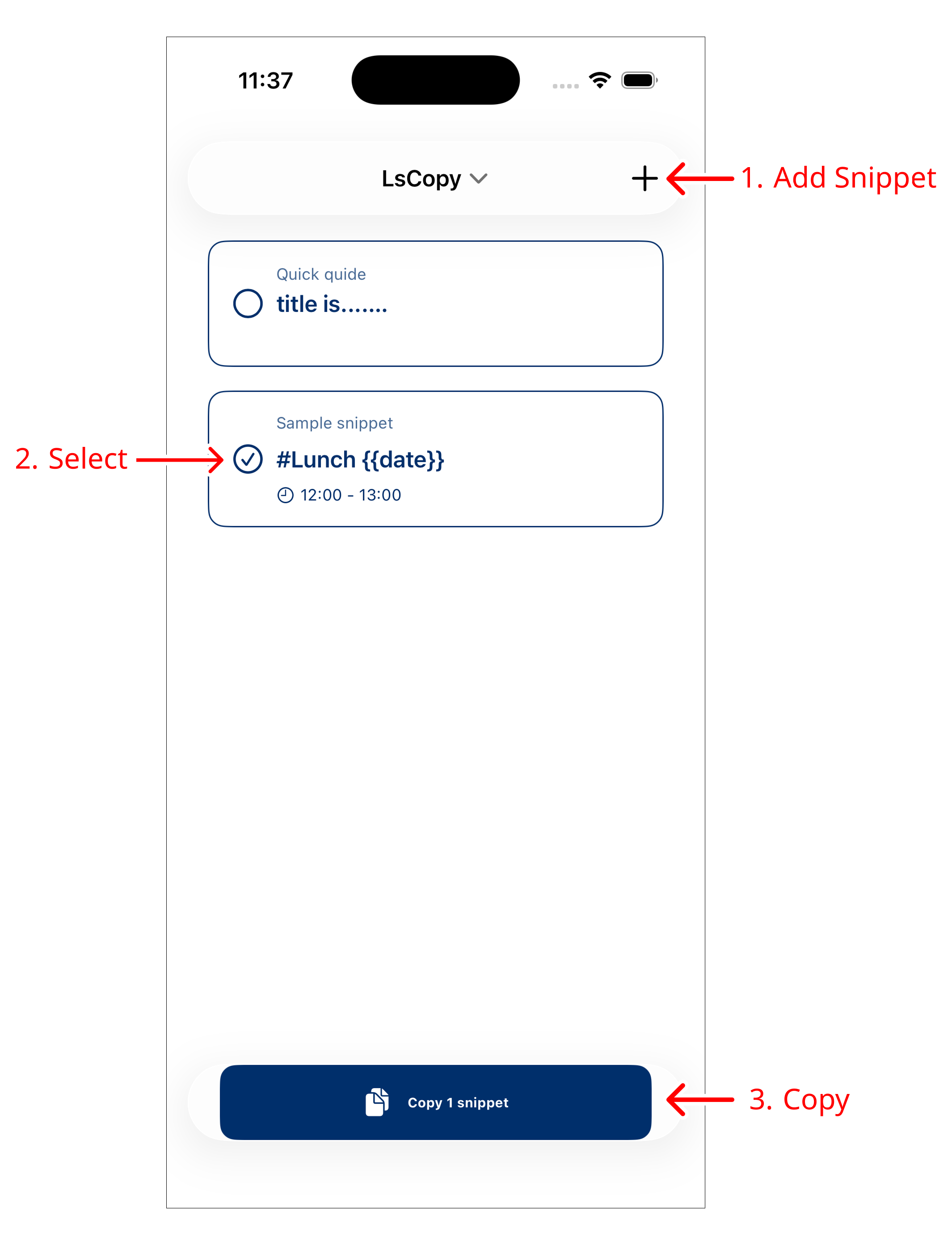
- Add a Snippet
Tap the "+" button in the top-right corner, enter an optional title and the required body text, then tap “Save”. - Select Snippets
Tap the circular checkmark on the left side of any snippet you want to copy (multiple selections supported). - Copy to Clipboard
Tap the “Copy” bar at the bottom of the screen. The selected snippets will be concatenated and copied to your clipboard.
3. Detailed Features #
Time Range (Active Hours) #
You can set an active time range in the snippet creation/edit screen (e.g., 09:00 – 13:00).
- Snippets outside their active time window are automatically displayed in an inactive state.
- Re-evaluating Status (Pull to Refresh):
If a time boundary passes while the app remains open, scroll to the top of the snippet list and pull down to refresh. The list will immediately update based on the current time.
Date Placeholders #
Including {{date}} in your snippet text automatically expands to today’s date (e.g., 2026-10-14) when copied. This eliminates repetitive typing in daily reports, greetings, and chat communications.
Batch Copying Multiple Snippets #
Select multiple snippets before tapping the copy button to combine all checked items (separated by line breaks) and copy them in a single tap.
Editing and Deleting Snippets #
- Edit: Swipe the snippet card to access and tap “Edit”.
- Delete: Swipe the snippet card to the left and tap “Delete”.
4. Pro Tier (Paid Upgrade) #
Free vs. Pro Tier #
- Free Tier: Limited to a maximum of 3 snippets.
- Pro Tier (One-time Purchase): Unlocks the limit, allowing you to store and manage up to 300 snippets.
Restoring Purchases #
If you change devices or reinstall the application, you do not need to make another purchase.
- Tap the menu icon in the top-right corner.
- Select “Restore Purchase”.
- Once authenticated with the Apple ID used for the original purchase, Pro features will be reactivated at no additional cost.
5. FAQ & Support #
If you encounter any issues or have questions regarding operation, please visit our support pages below:
Last updated: October 13, 2026